

t_start, and any labels you pass. Everything accepts an EmbeddingResponse or a plain [N, 768] array.
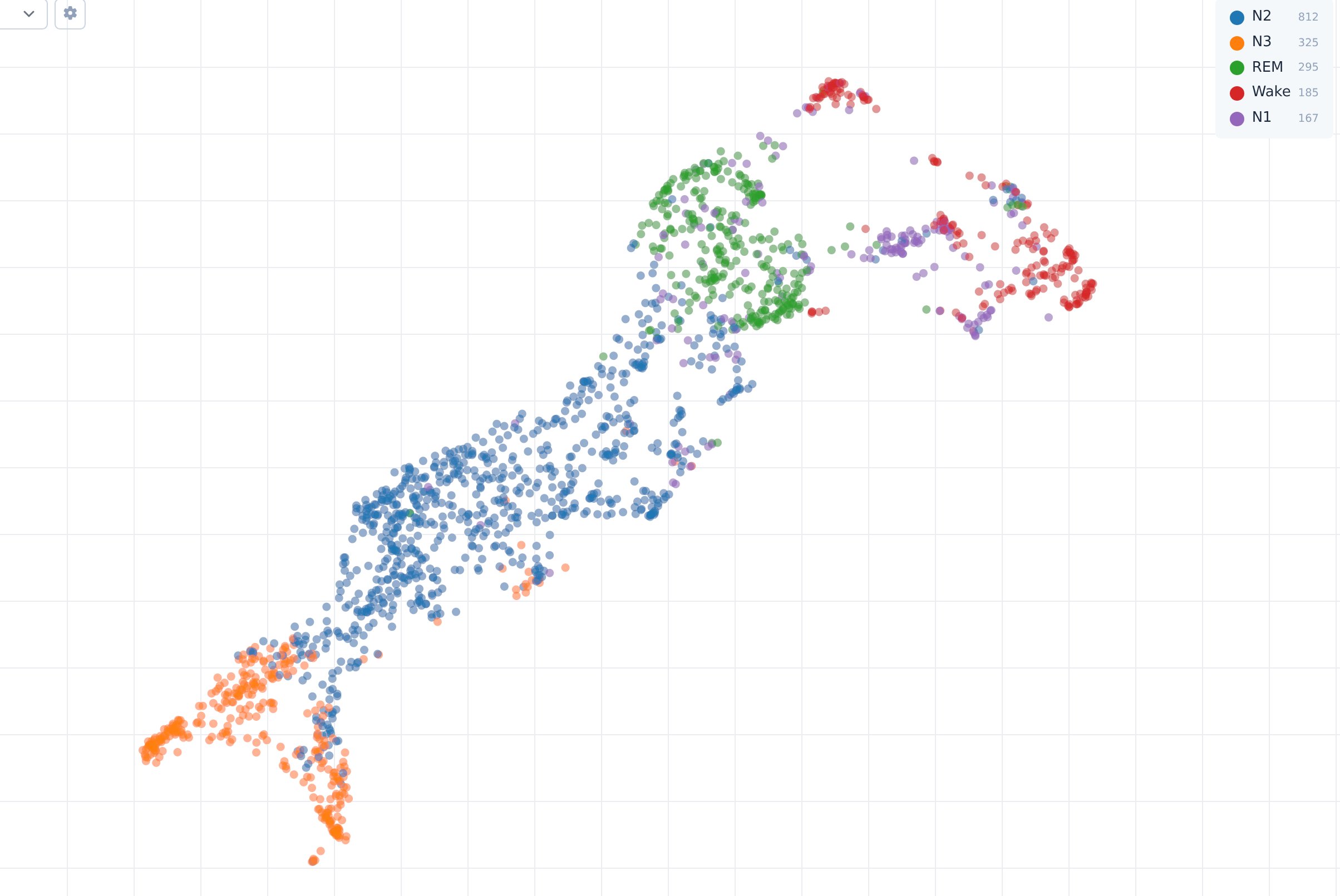
Two nights of PhysioNet Sleep-EDF (subjects 0 and 1), two EEG channels, 1,784 thirty-second windows embedded with EPI-300K and coloured by the expert-scored stage. The model was not trained on this data.
Reproduce the figure
Arguments
All four functions share these:str | list
One label per window (sleep stage, event, subject). Becomes the default colour and a filterable column.
str | list
Source recording per window.
array
Window start in seconds. Taken from the response automatically.
dict
Extra per-window columns, e.g.
{"subject": ids, "score": p}.str
Column to colour by; defaults to
label, else time_s.str
default:"umap"
umap, tsne or pca.int
default:"15"
Neighbours for the projection and the neighbour list.
bool
default:"false"
Side and bottom panels.
For agents
ne.serve(..., mcp=True) exposes the Atlas MCP server at /mcp, so a coding agent can select, filter and inspect points in the running view. ne.export writes a static folder an agent can host or attach; ne.plot(..., save=path) returns the PNG path.